[教學]DVDStyler製作DVD選單(三)設定影片播放結束動作
班上的燒餅同學上上堂提出一個問題:「如果有一部以上的影片,要讓 "影片a" 結束直接播放 "影片b" 要怎麼做?」
軟體預設影片播放結束會直接回到選單,
燒餅的這個問題這次的課堂上有示範如何解決。
首先讓我們放入兩個影片到選單上。
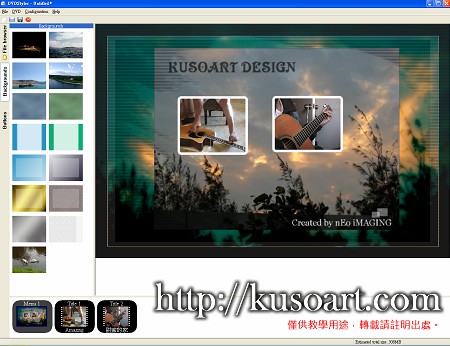
滑鼠移動到下方的Title1上,按下右鍵選擇「Properties」。

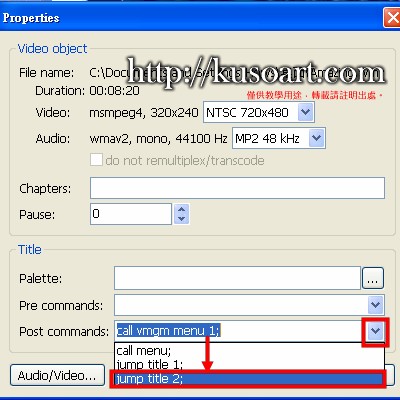
接著點選下方的Post Commands右邊的箭頭,拉下選單後選擇「jump title 2;」
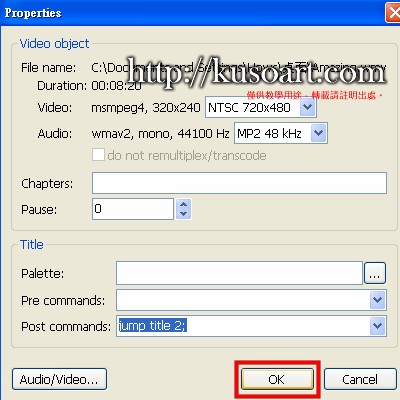
確認變成"jump title 2"之後就可以按下方的「OK」!
大功告成!
燒出來的DVD中,Title 1結束會直接播放Title 2。
希望這一個小小的動作對需要的朋友可以發揮大大的作用 🙂
I have been searching for a reliable platform to enjoy my favorite casino games and I finally found my spot. The login process is smooth and the customer support team is always ready to help. I highly recommend this site for both newcomers and seasoned players. dmwinlogingame
Finding a safe online spot in the Philippines used to feel like luck of the draw but this casino changed my mindset completely. The slot variety is massive and the support chat replies within minutes even at midnight. I keep returning for the weekend free spins. ph77777casino
Even though I play mostly in English the vibe here is so welcoming. The sports section is packed and I love the live streaming features. Seriously go to lafijaapuestas to feel the excitement